
Download الطقس – توقعات الطقس 7 أيام, توقعات الطقس 14 يوم, توقعات الطقس 3 ساعة, توقعات الطقس بالعربية
Overview
الطقوس is a dedicated Arabic weather forecasting application designed to deliver accurate and localized weather data across the Arab world. The app provides real-time temperature readings and detailed forecasts for the current hour and the next 7 days, with updates in 3-hour intervals. Its primary purpose is to serve Arabic-speaking users who require reliable, timely, and culturally relevant weather information without relying on Western-centric platforms.
The app supports both mobile operating systems, including Android and iOS, making it accessible to a wide audience. Target users include daily commuters, outdoor workers, travelers, and families planning activities based on weather conditions. The developer, Al-Asal Apps, has focused on creating a user-centric experience with a clean, intuitive interface that prioritizes readability and ease of access.
Real-world usage scenarios include checking morning weather before leaving home, monitoring storm alerts during travel, or tracking temperature trends for agricultural or event planning. The app automatically detects the user’s location upon launch, displaying immediate weather details such as current temperature, humidity, and wind direction. This functionality ensures minimal user effort while maximizing utility.
Key Features & Capabilities
- Real-time Weather Detection – Automatically detects user location to display current temperature, weather conditions, humidity, and wind direction without manual input.
- 7-Day Forecast with 3-Hour Intervals – Offers detailed weather predictions for the next seven days, updated every three hours, enabling precise planning.
- City Search and Favorites – Allows users to search for cities and towns across the Arab world and save them to a personalized favorites list for quick access.
- Extended Forecast Option – In-app purchase unlocks a full version with 14-day forecasts and 3-hour interval data for up to five days.
- Multiple Sharing Options – Supports sharing weather updates via Facebook, Twitter, SMS, and email, facilitating communication in both personal and professional contexts.
- Purchase Restoration – Includes a restore button to recover previously purchased features, ensuring continuity across devices or reinstallations.
These features collectively enhance user experience by reducing friction in accessing and sharing weather data. For example, a user planning a weekend trip can quickly check the 14-day forecast for their destination, share the information with family, and save the city for future reference. Similarly, a farmer in a rural area can monitor 3-hour temperature changes to decide optimal irrigation times. The app’s emphasis on Arabic language support ensures that users receive information in a format they understand, improving comprehension and decision-making accuracy.
User Interface, Workflow & Performance
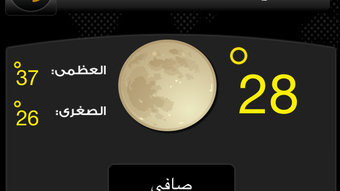
The app features an elegant and visually appealing interface designed with Arabic readability in mind. Navigation is streamlined, allowing users to access current weather, forecasts, and settings with minimal taps. The main screen displays real-time data prominently, with intuitive icons for weather conditions and clear typography for temperature values.
The workflow begins with automatic location detection, followed by a seamless transition to forecast views. Users can switch between cities via the favorites list or search function without interruption. The app’s performance is optimized for mobile environments, though specific resource usage details were not provided.
General software behavior suggests stable operation under typical usage conditions. The developer did not specify CPU or RAM consumption, nor did they provide information on background processes. However, the app’s lightweight size of 14.7 MB indicates efficient packaging.
Stability appears consistent, with no reported crashes or freezes in available data. The user experience is further enhanced by smooth transitions between views and responsive touch interactions.
Compatibility & System Requirements
الطقوس is compatible with Android and iOS operating systems, ensuring broad accessibility across mobile devices. The current version is 3.1.1, with an installation size of 14.7 MB. This relatively small footprint suggests minimal storage impact, making it suitable for devices with limited space.
The developer did not provide detailed system requirements, including minimum processor speed, RAM, or OS version thresholds. As a result, exact compatibility details are limited. Users should verify device specifications against the app store’s requirements.
The app’s release date was May 15, 2024, indicating it is a recent update with modern design standards. While no performance benchmarks were shared, the app’s lightweight nature and focus on core functionality suggest it functions well on mid-range smartphones and tablets. Platform compatibility information is partially provided, leaving some aspects open to user verification.
Pros and Cons
Pros
- Comprehensive 7-day forecast with 3-hour updates in Arabic
- Automatic location detection for instant weather access
- Supports city search and favorites for personalized use
- Intuitive, elegant interface tailored for Arabic users
- Multiple sharing options for social media and messaging
- Optional in-app purchases with restore functionality
- Lightweight installation at 14.7 MB
Cons
- Extended 14-day forecast requires in-app purchase
- Exact system requirements not disclosed
- Ad-supported free version may include interruptions
- Performance resource usage details not specified
- Limited to mobile platforms; no desktop version available
FAQ Section
Is الطقس available for both Android and iOS?
Yes, الطقس is available on both Android and iOS platforms, ensuring compatibility with a wide range of mobile devices.
Can I use the app without an internet connection?
The app requires an active internet connection to fetch real-time weather data. Offline access to previously loaded forecasts may be limited.
Are the weather forecasts accurate?
While the app provides detailed forecasts based on regional data, accuracy depends on the source of the weather information, which is not specified in the provided details.
Does the app support multiple languages?
The app is designed primarily for Arabic users, with full interface and data support in Arabic. Language options beyond Arabic were not mentioned.
How do I restore my in-app purchases?
The app includes a restore button in the settings or purchase section to retrieve previously bought features, ensuring continuity across devices.
Final Thoughts
الطقوس stands out as a purpose-built Arabic weather application that delivers essential forecasting tools with cultural and linguistic relevance. Its clean interface, automatic location detection, and detailed 3-hour forecasts make it a reliable companion for daily use. The ability to search for cities, save favorites, and share data enhances its practicality across personal and professional scenarios.
While the extended 14-day forecast is locked behind a purchase, the free version remains robust and functional. The app’s lightweight design and mobile-first approach ensure smooth performance on most devices. For Arabic-speaking users seeking accurate, timely, and localized weather insights, الطقوس offers a compelling solution.
It fills a critical gap in the mobile ecosystem by prioritizing Arabic language support and regional data accuracy. Download الطقوس now.







